By default, the image gallery displays separately below listing description, for example:
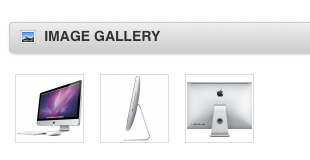
If you want to display the gallery below main listing image like this:

you will need to modify this file:
- /com_jreviews/jreviews/views/themes/{your_theme}/listings/detail.thtml
Find the code for main listing image:
<?php if((!empty($listing['Listing']['images']) || $this->Config->content_default_image) && $enableIntroImage && $introImage):?>
    <!-- MAIN IMAGE -->
    <div class="itemMainImage" style="width:<?php echo $introThumbnailSize;?>px;"><?php echo $introImage;?></div>
<?php endif;?>
replace it with this code which includes image gallery also:
<?php if((!empty($listing['Listing']['images']) || $this->Config->content_default_image) && $enableIntroImage && $introImage):?>


<div class="itemImages" style="width:<?php echo $introThumbnailSize+4;?>px;">
    <!-- MAIN IMAGE -->
    <div class="itemMainImage" style="width:<?php echo $introThumbnailSize;?>px;"><?php echo $introImage;?></div>
    <!-- IMAGE GALLERY -->
    <?php if(($enableGallery && (($enableIntroImage && $imageCount > 1) || (!$enableIntroImage && $imageCount >= 1)))):?>
        <div class="itemThumbnails clearfix">
        <?php for($i=(int)$enableIntroImage;$i<$imageCount;$i++):?>
             <div><?php echo $Thumbnail->lightbox($listing,$i,array('tn_mode'=>$galleryThumbnailMode,'dimensions'=>array($galleryThumbnailSize)));?></div>
         <?php endfor;?>
         </div>
     <?php endif;?>
     </div>
 <?php endif;?>
and delete the old code for the gallery:
<!-- IMAGE GALLERY -->
<?php if(($enableGallery && (($enableIntroImage && $imageCount > 1) || (!$enableIntroImage && $imageCount >= 1)))):?>
     <div class="clear"></div>
     <h3 class="jrHeading">
         <span class="jrIcon jrIconGallery"></span>
         <span class="jrHeadingText"><?php __t("Image Gallery");?></span>
     </h3>
     <div class="itemThumbnails clearfix">
     <?php for($i=(int)$enableIntroImage;$i<$imageCount;$i++):?>
         <div><?php echo $Thumbnail->lightbox($listing,$i,array('tn_mode'=>$galleryThumbnailMode,'dimensions'=>array($galleryThumbnailSize)));?></div>
     <?php endfor;?>
     </div>
<?php endif;?>
These changes will also require new css styles. Paste the below code into custom_styles.css in your theme:
div.itemImages {
    float: right;
    margin: 0 0 30px 10px;
    text-align: center;
}
div.itemImages div.itemMainImage {
    margin: 0 0 10px 0;
    overflow: hidden;
    clear: both;
}
div.itemImages div.itemThumbnails {
    clear: both;
}
div.itemImages div.itemThumbnails div {
    border: 1px solid #ccc;
    float: left;
    margin: 0 5px 7px 0;
    overflow: hidden;
    padding: 1px;
    text-align: center;
    vertical-align: middle;
}